Know Where You Took That Photo!
Use HoudahGeo to geocode and geotag your photos and videos. Add GPS locations to your media. “Pin” every memory to the place where it was captured.
HoudahGeo embeds GPS coordinates — latitude, longitude, and altitude — directly into image and video files, just like a GPS-enabled camera. This makes your media location-aware and future-proof.
Geotagging is easy with HoudahGeo. Import a GPX track, use reference photos, or pick locations on a map. HoudahGeo supports a wide range of automatic and manual geocoding methods. Works seamlessly with Apple Photos, Adobe Lightroom, and GPX tracks from any GPS device.
Now with video geotagging, you can add GPS metadata to supported video file formats — ideal for drone footage, action cams, or any video shot on the move.

View. Organize. Find!
Whether you're documenting your travels, enhancing your real estate listings, or capturing wildlife behavior, HoudahGeo has you covered.
Location information gives your memories meaningful context. See a bird's-eye view of where your photos were taken and trace the route you followed. Relive and share your adventures.
Geotags tie your photos and videos to specific geographic locations. Unlike locations assigned in Apple Photos, geotags stay embedded with your files — ready for any app, any platform, any future.
Use Apple Photos or Adobe Lightroom to organize and search photos by GPS location. HoudahGeo keeps your Apple Photos library in sync — GPS metadata is written to your files and reflected in the app.
Customer Voices
HoudahGeo 7.2 works with macOS 12.4 Monterey through macOS 27 Golden Gate.
Automatic Geocoding
Use a GPS device, a track logger, or your phone to record a GPS track log and mark waypoints. HoudahGeo matches your images and videos to the GPS data by timestamp — no GPS-enabled camera needed.
HoudahGeo supports many common track log file formats: GPX (GPS Exchange Format), NMEA, Garmin FIT, Wintec TES, etc.
Use your iPhone or GPS-enabled camera to take geotagged reference photos. HoudahGeo uses these to geocode photos and videos taken during the same timeframe.

Geocoding Without a GPS
Camera has no GPS? No problem. Use the built-in map to verify, adjust, or assign locations to your media. Simply drag images to map locations for quick geocoding.
HoudahGeo also connects to Google Earth, letting you pick locations from the globe.
Use HoudahGeo Places to quickly assign coordinates and location names to photos taken at your favorite spots.
Using Lift & Stamp you can copy location information, keywords, and more from one photo to another.

Start Geotagging Your Photos Today!
Download Free TrialView and Update Metadata
HoudahGeo saves metadata to industry standard EXIF, XMP, and IPTC tags — without re-compression or loss of quality.
It supports a wide range of formats, including JPEG, many RAW formats, and various video file types. HoudahGeo handles JPEG+RAW pairs as single items and supports XMP sidecar files.
Add location names, titles, descriptions, and keywords to your photos and videos.
Weather conditions and dive log data can provide valuable context for your media. HoudahGeo allows you to record details such as temperature, humidity, and dive depth.
Reverse geocoding fills in city, province, and country names.
HoudahGeo writes GPS coordinates and location names directly into your files — not just into Apple Photos. It also notifies Apple Photos of location changes, so your library stays in sync.

Bring Your Journeys to Life
Visualize your travels by placing media along the path you followed.
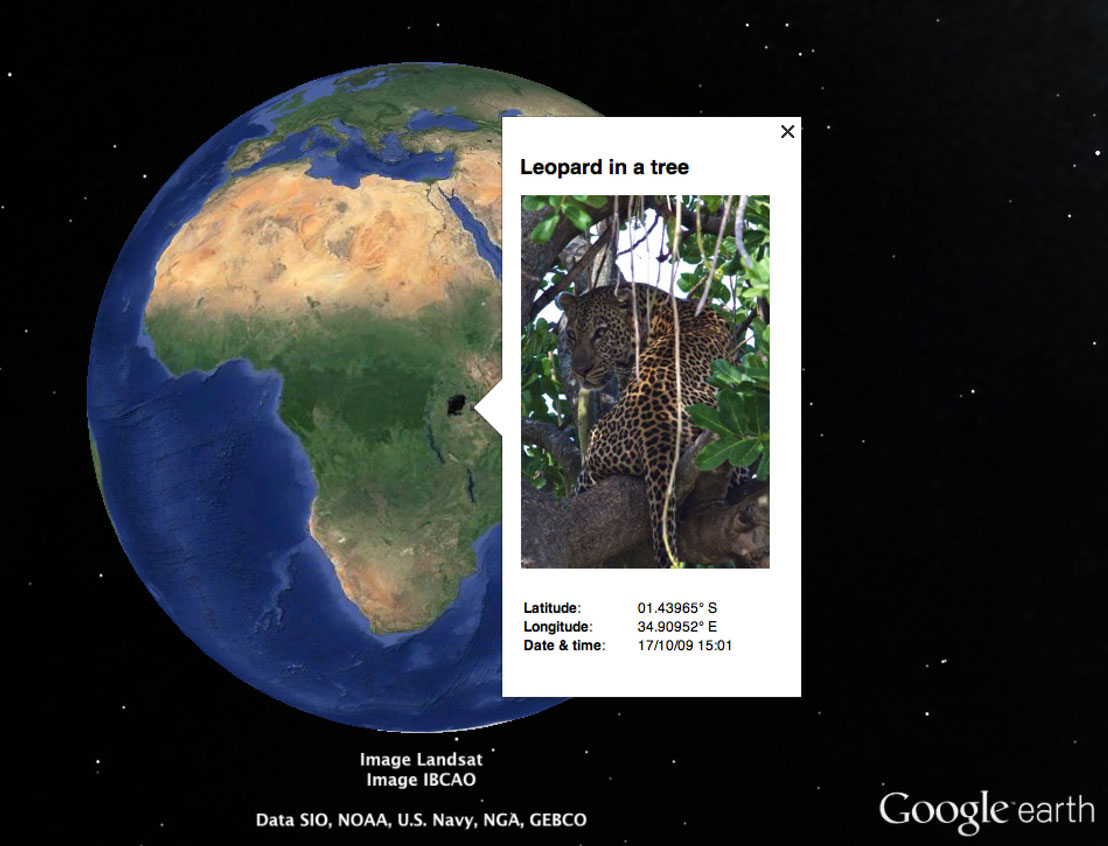
Create KML or KMZ files to explore your journey in Google Earth or share via Google My Maps.
Imagine going on a safari. Come home and see a bird's-eye view of your adventure. Find the exact tree where the leopard was perched.
Capture your adventures, then relive and share the full story — now with both photos and videos geotagged by HoudahGeo.
New in HoudahGeo 7
- Video Geotagging – HoudahGeo now supports geotagging of video files.
- New "Camera Setup" tool – Easily set the correct date and time information for your photos.
- Refreshed Interface – A modern look that streamlines geocoding workflows.
- All-New Map Experience – Enhanced tools for setting and verifying locations.
- Improved Media Browser – Browse photos and videos from folders, Apple Photos, and Lightroom.
- Faster Apple Photos Integration – Significantly quicker updates to metadata.
- Organized Favorite Places – Group favorite locations and hide groups when not needed.
- Customizable Exports – Use templates for Google Earth KML/KMZ and CSV exports.
- Customizable Toolbar – Personalize your workspace with your most-used tools.
- Apple Silicon Support – HoudahGeo runs natively on Apple Silicon Macs.
HoudahGeo 7.2 works with macOS 12.4 Monterey through macOS 27 Golden Gate.